Developer Guide
Table of Contents
Introduction
Ultimate DivocTracker (UDT) is a desktop app for managing COVID-19 contacts in school administration, optimized for use via interacting with the application through easy-to-use commands on a user-centric interface. Ultimate Divoc Tracker can get your contact-tracing tasks done faster than traditional GUI apps.
This is a Developer Guide written to help developers get a deeper understanding of how UDT is implemented and the reasons this project is done a certain way. It explains the internal structure and how components in the architecture work together to allow users to command UDT. Our team would like to welcome any form improvements or adaptations to our application via Github Pull Requests or Issues.
Acknowledgements
- This project is based on the AddressBook-Level3 project created by the SE-EDU initiative
Setting up, getting started
Refer to the guide Setting up and getting started.
Design
 Tip: The
 .puml files used to create diagrams in this document can be found in the diagrams folder. Refer to the PlantUML Tutorial at se-edu/guides to learn how to create and edit diagrams.
Architecture
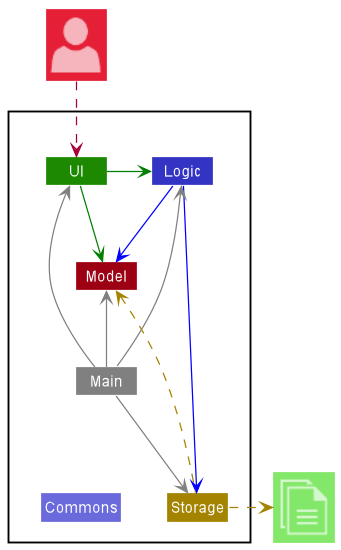
The Architecture Diagram given above explains the high-level design of the App.
Given below is a quick overview of main components and how they interact with each other.
Main components of the architecture
Main has two classes called Main and MainApp. It is responsible for,
- At app launch: Initializes the components in the correct sequence, and connects them up with each other.
- At shut down: Shuts down the components and invokes cleanup methods where necessary.
Commons represents a collection of classes used by multiple other components.
The rest of the App consists of four components.
-
UI: The UI of the App. -
Logic: The command executor. -
Model: Holds the data of the App in memory. -
Storage: Reads data from, and writes data to, the hard disk.
How the architecture components interact with each other
The Sequence Diagram below shows how the components interact with each other for the scenario where the user issues the command delete 1.
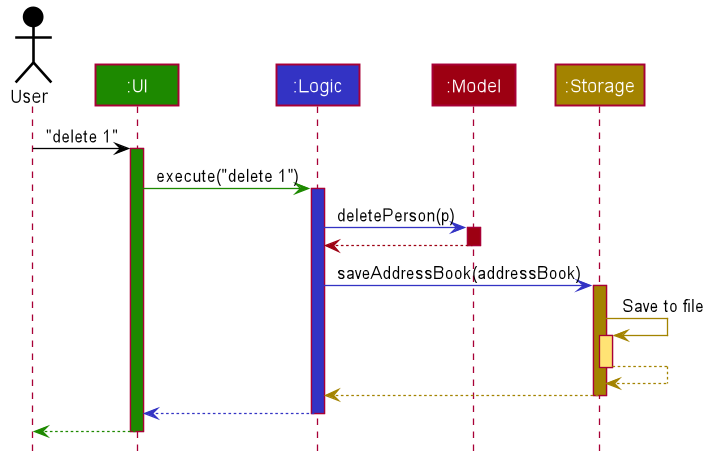
Each of the four main components (also shown in the diagram above),
- defines its API in an
interfacewith the same name as the Component. - implements its functionality using a concrete
{Component Name}Managerclass (which follows the corresponding APIinterfacementioned in the previous point.
For example, the Logic component defines its API in the Logic.java interface and implements its functionality using the LogicManager.java class which follows the Logic interface. Other components interact with a given component through its interface rather than the concrete class (reason: to prevent outside component’s being coupled to the implementation of a component), as illustrated in the (partial) class diagram below.
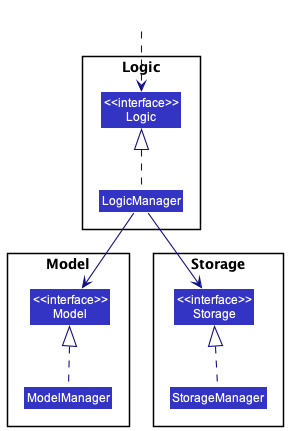
The sections below give more details of each component.
UI component
The API of this component is specified in Ui.java
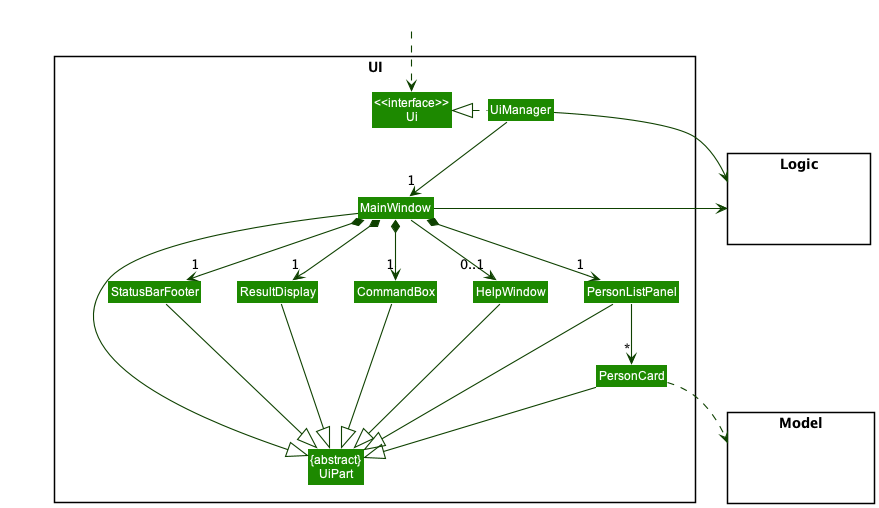
The UI consists of a MainWindow that is made up of parts e.g.CommandBox, ResultDisplay, PersonListPanel, StatusBarFooter etc. All these, including the MainWindow, inherit from the abstract UiPart class which captures the commonalities between classes that represent parts of the visible GUI.
The UI component uses the JavaFx UI framework. The layout of these UI parts are defined in matching .fxml files that are in the src/main/resources/view folder. For example, the layout of the MainWindow is specified in MainWindow.fxml
The UI component,
- executes user commands using the
Logiccomponent. - listens for changes to
Modeldata so that the UI can be updated with the modified data. - keeps a reference to the
Logiccomponent, because theUIrelies on theLogicto execute commands. - depends on some classes in the
Modelcomponent, as it displaysPersonobject residing in theModel.
Logic component
API : Logic.java
Here’s a (partial) class diagram of the Logic component:
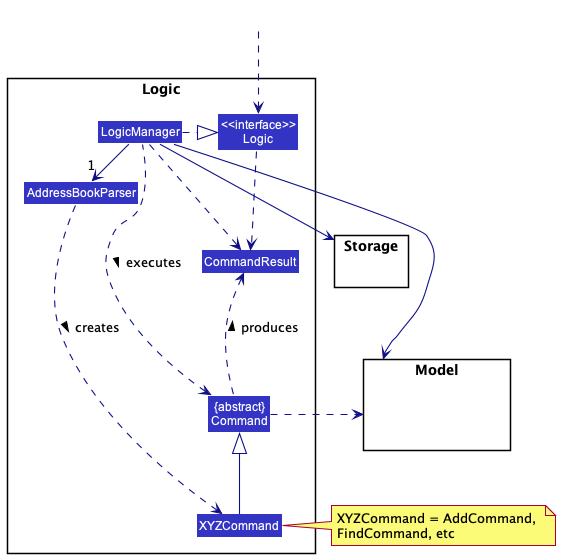
How the Logic component works:
- When
Logicis called upon to execute a command, it uses theAddressBookParserclass to parse the user command. - This results in a
Commandobject (more precisely, an object of one of its subclasses e.g.,AddCommand) which is executed by theLogicManager. - The command can communicate with the
Modelwhen it is executed (e.g. to add a person). - The result of the command execution is encapsulated as a
CommandResultobject which is returned back fromLogic.
The Sequence Diagram below illustrates the interactions within the Logic component for the execute("delete 1") API call.
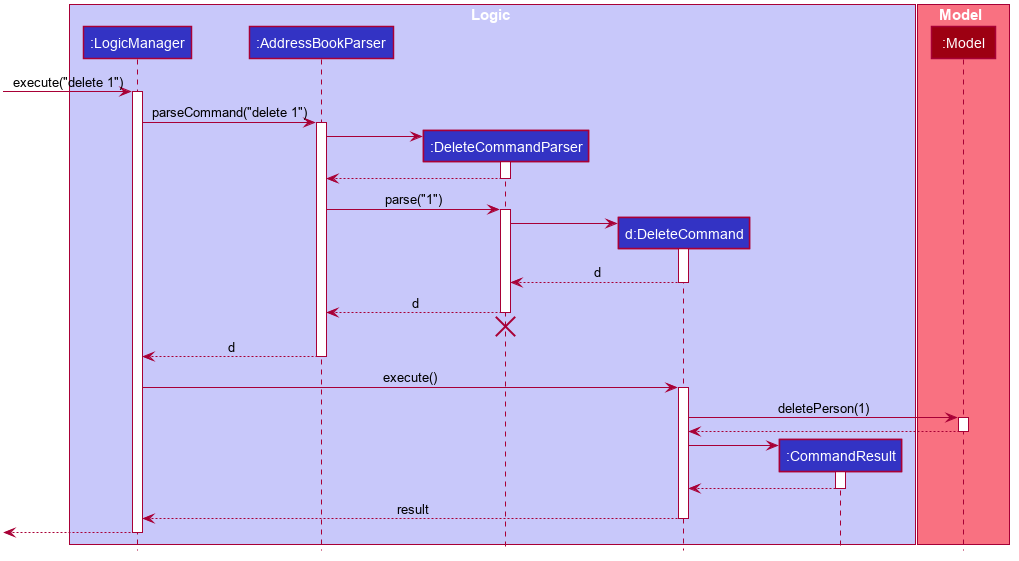
 Note: The lifeline for
 DeleteCommandParser should end at the destroy marker (X) but due to a limitation of PlantUML, the lifeline reaches the end of diagram.
Here are the other classes in Logic (omitted from the class diagram above) that are used for parsing a user command:
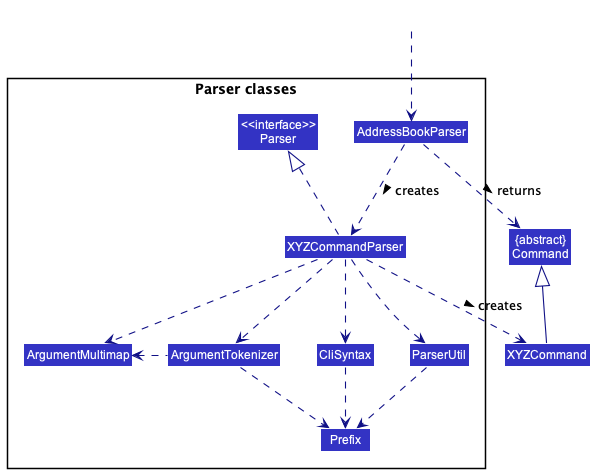
How the parsing works:
- When called upon to parse a user command, the
AddressBookParserclass creates anXYZCommandParser(XYZis a placeholder for the specific command name e.g.,AddCommandParser) which uses the other classes shown above to parse the user command and create aXYZCommandobject (e.g.,AddCommand) which theAddressBookParserreturns back as aCommandobject. - All
XYZCommandParserclasses (e.g.,AddCommandParser,DeleteCommandParser, …) inherit from theParserinterface so that they can be treated similarly where possible e.g, during testing.
Model component
API : Model.java
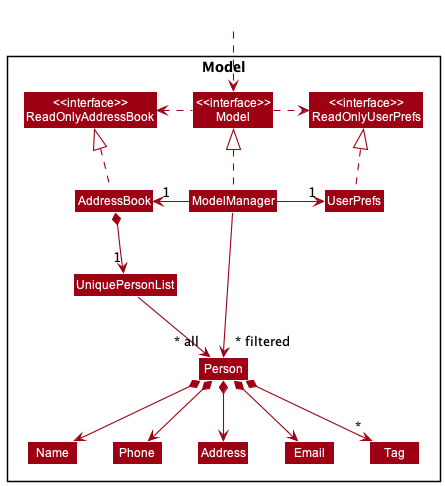
The Model component,
- stores the address book data i.e., all
Personobjects (which are contained in aUniquePersonListobject). - stores the currently ‘selected’
Personobjects (e.g., results of a search query) as a separate filtered list which is exposed to outsiders as an unmodifiableObservableList<Person>that can be ‘observed’ e.g. the UI can be bound to this list so that the UI automatically updates when the data in the list change. - stores a
UserPrefobject that represents the user’s preferences. This is exposed to the outside as aReadOnlyUserPrefobjects. - does not depend on any of the other three components (as the
Modelrepresents data entities of the domain, they should make sense on their own without depending on other components)
Note: An alternative (arguably, a more OOP) model is given below. It has a Tag list in the AddressBook, which Person references. This allows AddressBook to only require one Tag object per unique tag, instead of each Person needing their own Tag objects.
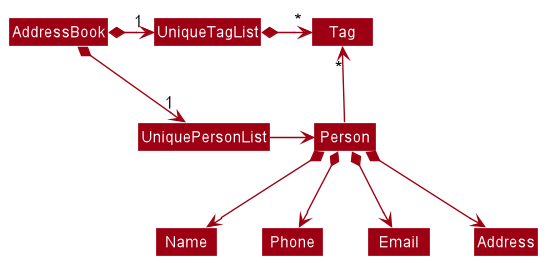
Storage component
API : Storage.java
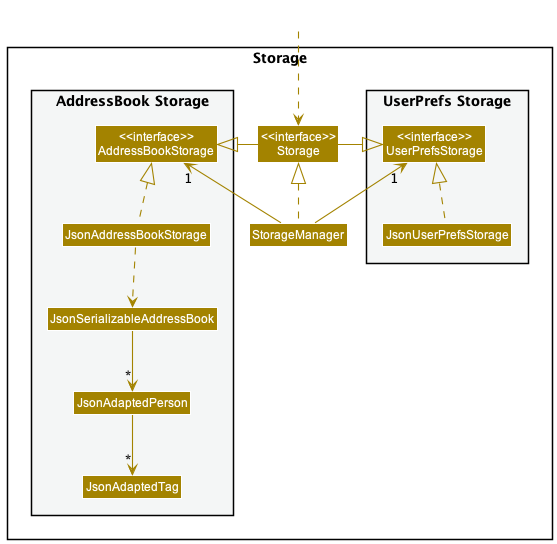
The Storage component,
- can save both address book data and user preference data in json format, and read them back into corresponding objects.
- inherits from both
AddressBookStorageandUserPrefStorage, which means it can be treated as either one (if only the functionality of only one is needed). - depends on some classes in the
Modelcomponent (because theStoragecomponent’s job is to save/retrieve objects that belong to theModel)
Common classes
Classes used by multiple components are in the seedu.addressbook.commons package.
Implementation
This section describes some noteworthy details on how certain features are implemented, updated or any new features that we have in mind.
- Implemented
- Updated
- Enhancements
- Proposed
[Implemented] Status Feature
Implementation
The implemented status label is facilitated by Status attribute. This label is an additional attribute for each person within the application
and is implemented as a separate file within the Person Package.
The Status attribute of each Person will take either "Positive", "Negative" or "Close Contact".
-
"Positive"denotes that thePersonis labelled as COVID positive. -
"Negative"denotes that thePersonis labelled as COVID negative. -
"Close Contact"denotes that thePersonis labelled as having close contact to anotherPersonwho is COVID positive.
The Status class is facilitated by using execute() command in the EditCommand and AddCommand classes.
Design considerations:
Aspect: Abstracting Status attribute
-
Alternative 1 (current choice): Abstracted class.
- Pros:
- Higher Level of abstraction
- Changes can be made easily from this class
- Cons:
- Existing layers of abstraction and tangled dependencies make introducing a new attribute for the base Person model difficult
- Difficulty navigating through folders to find specific files
- Pros:
-
Alternative 2: Attribute placed within
Personclass.- Pros:
- Single file where changes can be made
- Cons:
- Lesser level of abstraction, changes made have to be constantly changed throughout the file
- Pros:
[Implemented] Find By Status Feature
Implementation
The implemented find by status mechanism is facilitated by findstatus command. It extends UDT with a Find By Status, allowing users to find persons by their current COVID-19 statuses.
Classes added for this feature:
StatusContainsKeywordsPredicateFindStatusCommandFindStatusCommandParser
Given below is an example usage scenario and how the find by status mechanism behaves at each step.
Step 1. The user launches the application. The full list of Persons will be shown to the user.
Step 2. The user executes findstatus positive command to find all Persons that are COVID positive in the address book. The findstatus command calls AddressBookParser#parseCommand() to parse the command given, which then calls FindStatusCommandParser#parse() to parse the given arguments.
Step 3. FindStatusCommandParser#parse() calls FindStatusCommand’s constructor along with StatusContainsKeywordsPredicate’s constructor given the arguments to allow the command, when executed, to use the given Predicate (Java) to filter the list of Persons by checking if they have the matching Status of "positive".
Step 4. The filtered list of persons is displayed to the user.
The following sequence diagram shows how the findstatus operation works:
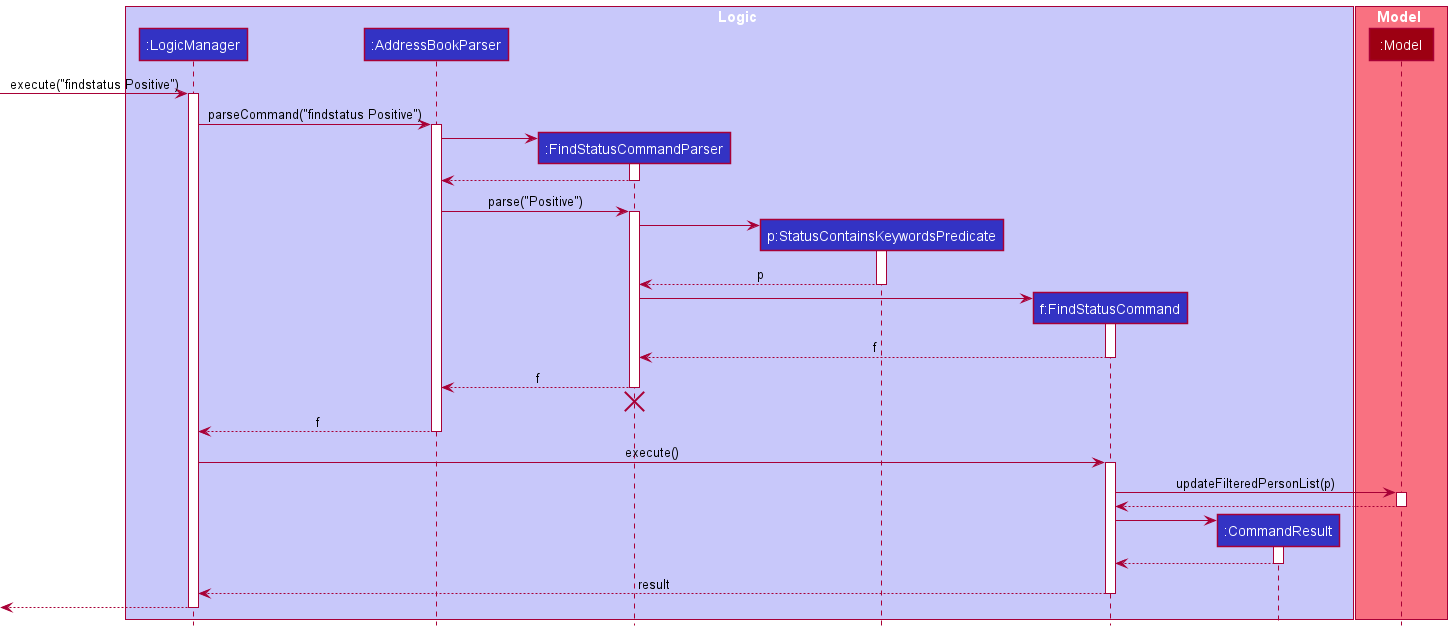
Note: The lifeline for FindStatusCommandParser should end at the destroy marker (X) but due to a limitation of PlantUML, the lifeline reaches the end of diagram.
Design considerations:
Aspect: Abstracting into different classes
-
Alternative 1 (current choice): Abstracted classes.
- Pros:
- Higher Level of abstraction
- Changes can be made easily for each class
- Better organisation of classes into separate packages (e.g.
FindStatusCommandParserbelongs to theparserpackage)- Different classes serve different lower-level purposes
- Cons:
- Adds more class files to the currently already large amount of class files
- Changes to one method may require going through all the different class files due to high level of abstraction
- Pros:
-
Alternative 2: Single command that executed upon reading from parser
- Pros:
- Single class file where changes can be made
- Cons:
- Lesser level of abstraction, class file may become exceptionally long to accommodate all the smaller features required
- May violate SLAP principles, as every thing is done in a single class
- Pros:
[Implemented] ClassCode Feature
Implementation
The implemented Class Code label is facilitated by ClassCode. It extends AddressBook with a Class Code, tied to each person.
- Group students by using
ClassCodeand used as an identifier for contact-tracing.
The ClassCode attribute of each Person will take a String (Java) denoting their class groups.
Classes changed for this feature:
AddCommandEditCommandAddCommandParserEditCommandParser
Design considerations:
Aspect: Creating a new Person in the contact list:
-
Alternative 1 (current choice): Each Person is created with an association to a classcode
- Pros:
- Adds an additional layer of filtering of Persons in the school.
- Differentiate a student from another with Classcode instead of Activity.
- Easy to implement.
- Cons:
- Difficult to scope the naming convention of the classcode.
- Different commands and logic files will be affected from the introduction of a new attribute.
- Need to change default data set with new attribute.
- Pros:
-
Alternative 2: Each Person is added without a classcode
- Pros:
- Prone to less error.
- Cons:
- Makes it difficult to filter Students for future feature implementations.
- Pros:
Limitations and proposed solutions
Currently, ClassCode attribute only allows a strict naming convention [number from 1 - 6][Letters from A-Z].
- Examples: 6A, 4B, 2H
Solution: Keep to the restriction of the naming convention.
[Implemented] Find By ClassCode Feature
Implementation
The implemented find by class code mechanism is facilitated by FindByClassCode. It extends AddressBook with a Find By Class Code, allowing users to find persons by their current statuses.
Classes added for this feature:
ClassCodeContainsKeywordsPredicateFindClassCodeCommandFindClassCodeCommandParser
Given below is an example usage scenario and how the find by class code mechanism behaves at each step.
Step 1. The user launches the application. The full list of Persons will be shown to the user.
Step 2. The user executes findclasscode 4A command to find all Persons that are COVID positive in the address book. The findclasscode command calls AddressBookParser#parseCommand() to parse the command given, which then calls FindClassCodeCommandParser#parse() to parse the given arguments.
Step 3. FindClassCodeCommandParser#parse() calls FindClassCodeCommand’s constructor along with ClassCodeContainsKeywordsPredicate’s constructor given the arguments to allow the command, when executed, to use the given Predicate (Java) to filter the list of Persons by checking if they have the matching ClassCode of "4A".
Step 4. The filtered list of perons is displayed to the user.
The following sequence diagram shows how the findclasscode operation works:
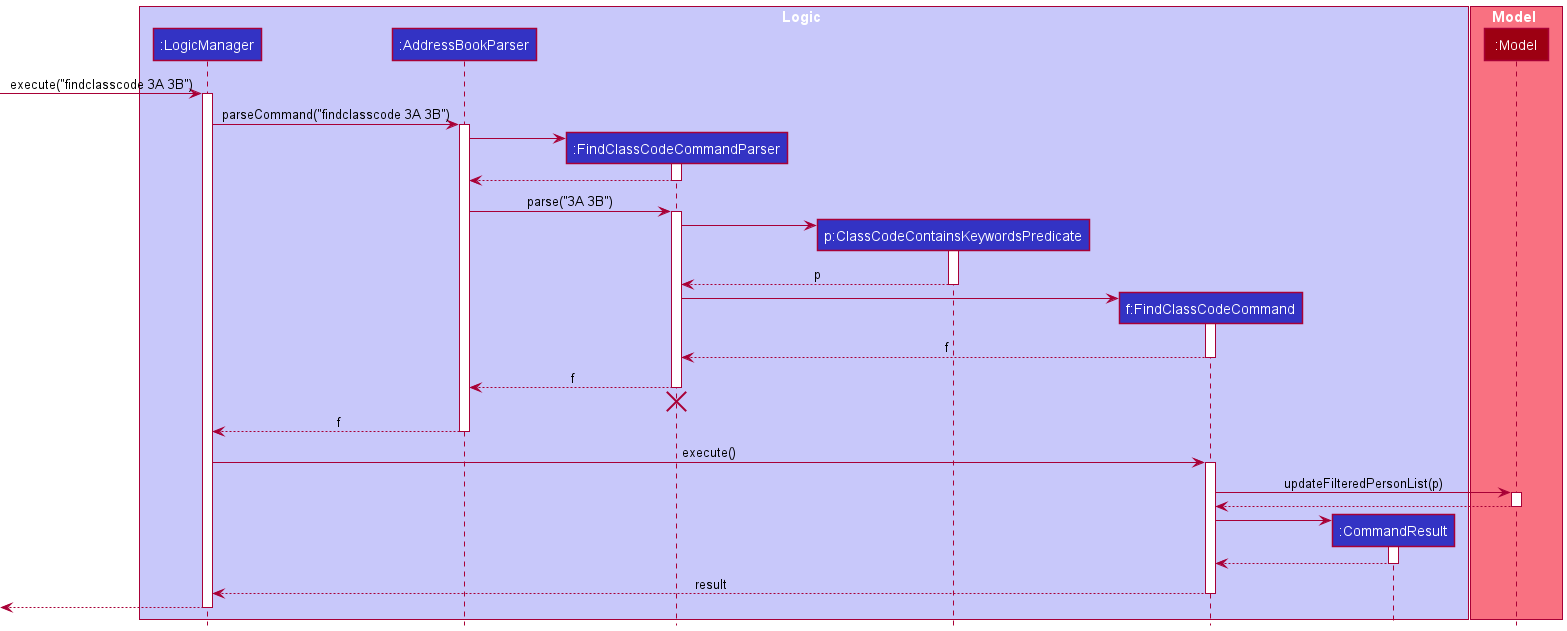
Note: The lifeline for FindClassCodeCommandParser should end at the destroy marker (X) but due to a limitation of PlantUML, the lifeline reaches the end of diagram.
Design considerations:
Aspect: Abstracting into different classes
-
Alternative 1 (current choice): Abstracted classes.
- Pros:
- Higher Level of abstraction
- Changes can be made easily for each class
- Better organisation of classes into separate packages (e.g.
FindStatusCommandParserbelongs to theparserpackage)- Different classes serve different lower-level purposes
- Cons:
- Adds more class files to the currently already large amount of class files
- Changes to one method may require going through all the different class files due to high level of abstraction
- Pros:
-
Alternative 2: Single command that executed upon reading from parser
- Pros:
- Single class file where changes can be made
- Cons:
- Lesser level of abstraction, class file may become exceptionally long to accommodate all the smaller features required
- May violate SLAP principles, as every thing is done in a single class
- Pros:
[Implemented] Activity Feature
Implementation
The implemented status label is facilitated by Activity attribute. This label is an additional attribute for each person within the application
and is implemented as a separate package within the activity Package. A person will have a Set of activity as an attribute.
The Activity attribute of each Person will take a String (Java) denoting their different activities
- Each
Personcan hold multipleActivityattributes.
Design considerations:
Aspect: Abstracting activity attribute
-
Alternative 1 (current choice): Abstracted class.
- Pros:
- Higher Level of abstraction
- Changes can be made easily from this class
- Ease of accommodating how
activityattribute can be implemented and added in to thePersonclass as aSet
- Cons:
- Existing layers of abstraction and tangled dependencies make introducing a new attribute for the base Person model difficult
- Difficulty navigating through folders to find specific files
- Pros:
-
Alternative 2: Attribute placed within
Personclass.- Pros:
- Single file where changes can be made
- Cons:
- Lesser level of abstraction, changes made have to be constantly changed throughout the file
- Pros:
[Implemented] Find By Activity Feature
Implementation
The implemented find by activity mechanism is facilitated by FindByActivity. It extends AddressBook with a Find By Activity, allowing users to find persons by their Activity.
Classes added for this feature:
ActivityContainsKeywordsPredicateFindActivityCommandFindActivityCommandParser
Given below is an example usage scenario and how the find by activity mechanism behaves at each step.
Step 1. The user launches the application. The full list of Persons will be shown to the user.
Step 2. The user executes findactivity choir command to find all Persons that are COVID positive in the address book. The findactivity command calls AddressBookParser#parseCommand() to parse the command given, which then calls FindActivityCommandParser#parse() to parse the given arguments.
Step 3. FindActivityCommandParser#parse() calls FindActivityCommand’s constructor along with ActivityContainsKeywordsPredicate’s constructor given the arguments to allow the command, when executed, to use the given Predicate (Java) to filter the list of Persons by checking if they have the matching Activity of "choir".
Step 4. The filtered list of perons is displayed to the user.
The following sequence diagram shows how the findactivity operation works:
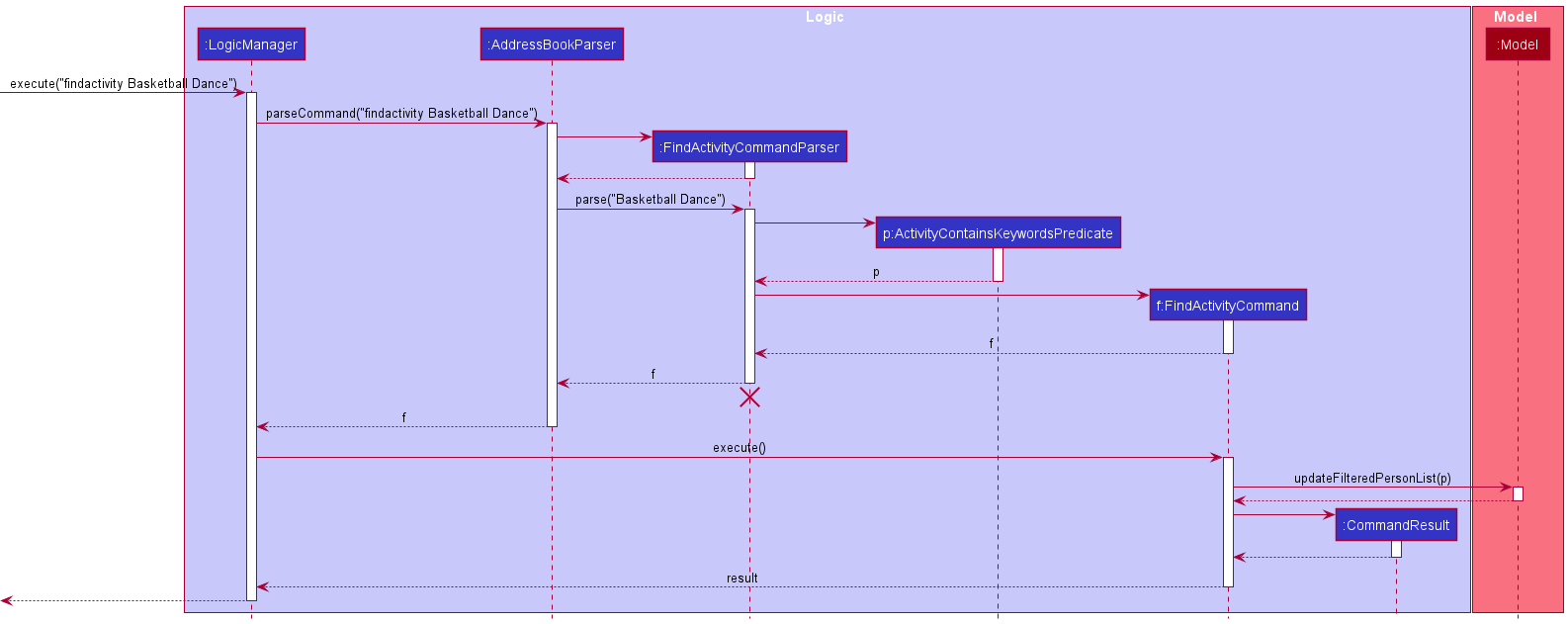
Note: The lifeline for FindActivityCommandParser should end at the destroy marker (X) but due to a limitation of PlantUML, the lifeline reaches the end of diagram.
Design considerations:
Aspect: Abstracting into different classes
-
Alternative 1 (current choice): Abstracted classes.
- Pros:
- Higher Level of abstraction
- Changes can be made easily for each class
- Better organisation of classes into separate packages (e.g.
FindActivityCommandParserbelongs to theparserpackage)- Different classes serve different lower-level purposes
- Cons:
- Adds more class files to the currently already large amount of class files
- Changes to one method may require going through all the different class files due to high level of abstraction
- Pros:
-
Alternative 2: Single command that executed upon reading from parser
- Pros:
- Single class file where changes can be made
- Cons:
- Lesser level of abstraction, class file may become exceptionally long to accommodate all the smaller features required
- May violate SLAP principles, as every thing is done in a single class
- Pros:
Aspect: findactivity with multiple inputs
-
Alternative 1 (current choice): Student participating in ANY of the input activities will be returned.
- Pros:
- Applicable to use case.
findactivitywith 2 inputs returns a list of students who are in either of those activities. Allows user to check across multiple activities instead of only that few students participating in both activities - More practical for usecase
- Applicable to use case.
- Cons:
- Less specific
- Returns a larger list as compared to alternative 2
- Pros:
-
Alternative 2: Student participating in ALL the input activities will be returned
- Pros:
- More specific, allowing for a more detailed search
- List is smaller and easier to browse through
- Cons:
- Only students who are participating in all the input activities will be returned, possibly only a handful of students which makes it slightly impractical to use
- Pros:
[Updated] Help Command
Updates
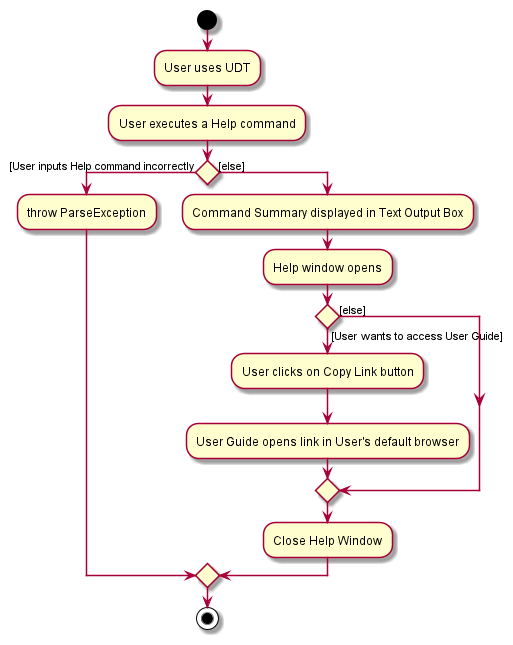
Help Command now displays a list a command summary within the Text Output Box, along with an external window containing a link to
UDT’s User Guide page. Previous version only provides a link to the User Guide page. Implementation was changed to help facilitate ease of use
when Users require help without having the need to go to the User Guide page.
 |
|---|
| Help Method - Activity Diagram |
Diagram above shows the execution paths for the help command.
 |
|---|
| Help Method - Sequence Diagram |
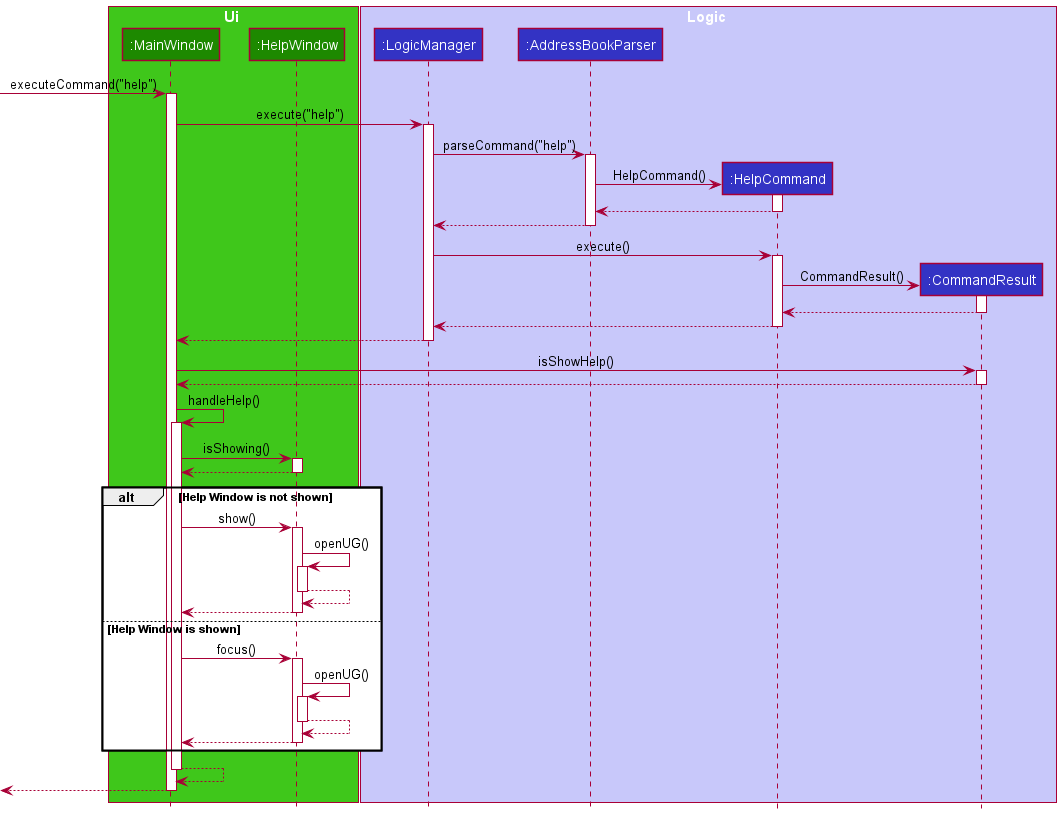
As seen in the sequence diagram for the help method above, executeCommand("help") is first called,
which then calls the execute() method from the LogicManager Class. AddressBookParser then parses the
command provided, calling upon the HelpCommand object, instantiating a CommandResult Object.
The MainWindow then checks the boolean value returned by the method isShowing(), calling the show()
method if the Help Window is not showing and focusing it otherwise.
[Updated] Adding a Person Feature
Updates
AddCommand is updated to accommodate the addition of the following attributes:
-
Status- Use the prefix
s/followed by theSTATUS(e.g.s/Positive).
- Use the prefix
-
ClassCode- Use the prefix
c/followed by theCLASSCODE(e.g.c/4A).
- Use the prefix
-
Activity- Use the prefix
act/followed by theACTIVITES(e.g.act/basketball). - A student can have ANY number of activities, including zero (optional).
- Use the prefix
The add feature was originally implemented in AB3 with only a select few attributes such as Name, Email, Phone number etc.
To properly, address the main issue that our app aims to solve, we have added and updated specific attributes such as Status, ClassCode
and Activities, which will be further elaborate on further into the Developer Guide.
To accommodate these new changes, updates were made to the CLISyntax class as well, for the new prefixes of the new attributes.
 |
|---|
| Add Method - Activity Diagram |
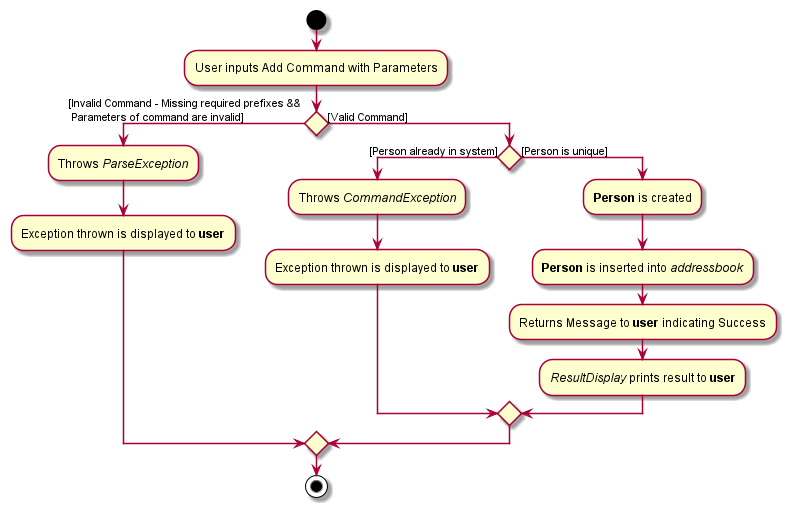
As seen in the figure above, when the add command is used, the parser checks if the command provided is valid, by checking
the prefixes as well as the details provided - a ParseException is thrown for invalid commands. Following a valid command,
a check is then performed to see if this Person has already been added, throwing a command exception if so. Otherwise,
the Person will be created with the details provided, inserted into the AddressBook and returns a success message
to the user. The Batch Update Feature is also implemented within the Add Command and checks for any Person that is
being added with a Positive Status.
 |
|---|
| Add Method - Class Diagram |
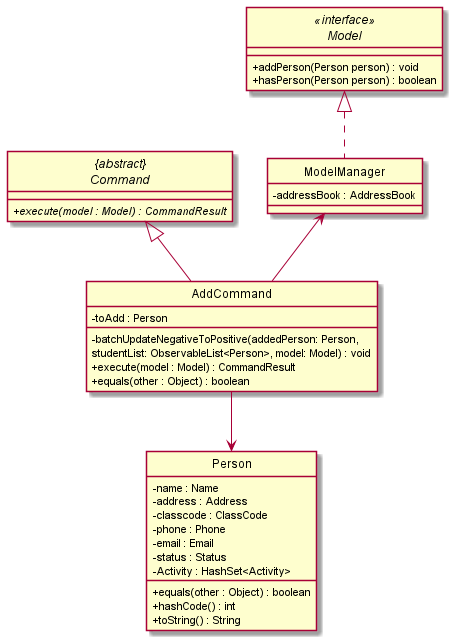
The AddCommand class extends from the Abstract Command class and its Class Diagram is as shown above. Within AddCommand,
there is an additional method batchUpdateNegativeToPositive that checks for any COVID-19 Positive students being added into
the addressbook. If so, other students within the same Activity and ClassCode will have their Status updated to Close-Contact.
[Updated] Editing a Person Feature
Updates
EditCommand is updated to accommodate the addition of the following attributes:
-
Status- Use the prefix
s/followed by theSTATUS(e.g.s/Negative).
- Use the prefix
-
ClassCode- Use the prefix
c/followed by theCLASSCODE(e.g.c/4B).
- Use the prefix
-
Activity- Use the prefix
act/followed by theACTIVITES(e.g.act/badminton). - When editing a student’s activities, the user has to list out all activities even if the activities have already been added.
- Use the prefix
[Updated] User Interface
Updates
The User Interface is updated to display the newly added attributes:
StatusClassCode-
Activity- The list of activities will be displayed horizontally under the name where each acitivity is contained in a blue box.
[Updated] Storage
Updates
The flow of saving and loading the data storage is updated to accommodate the addtion of
Status, ClassCode, and Activity.
[Enhancement] Batch Update
Enhancements
The purpose of the batch update enhancement is to update all students by ClassCode and Activity when the Status
of a student in that ClassCode or Activity changes from Negative -> Positive and vice-versa.
The batch update enhancement is facilitated by using execute() command in the EditCommand, AddCommand,
and DeleteCommand class.
Batch update depends on the Model and Person class and methods to implement this enhancement.
Design considerations:
Aspect: Updating a Person’s COVID-19 Status
-
Alternative 1 (current choice): Update other Students’ Status related to the recent.
- Pros:
- Update other students’ COVID-19 Status.
- Better tracking of student’s COVID-19 status in a classroom or activity.
- Cons:
- Difficult to implement.
- Changes to one method may require going through all the different class files due to high level of abstraction
- Pros:
-
Alternative 2: Only update filtered Person’s status.
- Pros:
- Single update where changes can be made.
- Cons:
- Does not compliment our application’s purpose of tracking COVID-19 cases efficiently.
- Pros:
Aspect: Adding a new Person with a Status of Positive or Negative
-
Alternative 1 (current choice): Check ALL students in the same class as the new Person entry.
- Pros:
- Efficiently update all the students’ status information with the same logic from
findclasscodewhere similar filtering process is used.
- Efficiently update all the students’ status information with the same logic from
- Cons:
- Perform more checks which may slow down the application.
- Pros:
-
Alternative 2: Only add the new student in without checking the status of other students.
- Pros:
- Does not perform an extra layer of checks which may improve the speed of the application.
- Cons:
- Would pose as a potential feature flaw for
AddPersonin the context of UDT. Since the priority is to ensure that theStatusof each student is update efficiently.
- Would pose as a potential feature flaw for
- Pros:
Aspect: Deleting an existing Person with a Status of Positive or Negative
-
Alternative 1 (current choice): Check ALL students in the same class as the deleted Person.
- Pros:
- Efficiently update all the students’ status information with the same logic from
findclasscodeandfindactivitywhere similar filtering process is used.
- Efficiently update all the students’ status information with the same logic from
- Cons:
- Perform more checks which may slow down the application.
- Pros:
-
Alternative 2: Only delete the existing student without updating the status of other students.
- Pros:
- Does not perform an extra layer of checks which may improve the speed of the application.
- Cons:
- Would pose as a potential feature flaw for
DeletePersonin the context of UDT. Since the priority is to ensure that theStatusof each student is update efficiently.
- Would pose as a potential feature flaw for
- Pros:
Implementation
-
EditCommand:
- When
batchUpdateNegativeToPositive()underexecute()inEditCommandchecks for a change inStatusif the person to edit fromNegative->PositiveandStatusis not alreadyPositive- If true, a filtered
Listof students with the sameClassCodeorAcitivtywho are notPositiveand not the current student being edited would be created. - All students
Statusin the filteredListwill be switched fromNegative->Close-Contact.
- If true, a filtered
- Conversely,
batchUpdatePositiveToNegative()underexecute()inEditCommandchecks if a student’sStatuschanges fromPositive->Negative.- If true, a filtered
Listof students with the sameClassCodeorActivitywho are not the current student edited would be created. - For every student in that list (denoted as A), another
Listis created consisting students who have the sameClassCodeorActivityas A and havePositiveas theirStatus.- If the
Listis empty, edit A’s status toNegative - Else, do nothing.
- If the
- If true, a filtered
- When
-
AddCommand:
- When
batchUpdateNegativeToPositive()underexecute()inAddCommandchecks for theStatusof the student added,- If the student to be added is
Positive,- A filtered
Listof students with the sameClassCodeorAcitivtywho are notPositiveand not the current student being added would be created. - All students
Statusin the filteredListwill be switched fromNegative->Close-Contact.
- A filtered
- If the student to be added is
NegativeorClose-Contact,- A filtered
Listof students with the sameClassCodeorAcitivtywho are not the current student being added would be created. - For every student in that list (denoted as A), another
Listis created consisting students who have the sameClassCodeorActivityas A and havePositiveas theirStatus.- If the
Listis empty, edit A’s status toNegative. - Else, edit the added student’s status to
Close-Contact.
- If the
- A filtered
- If the student to be added is
- When
-
DeleteCommand:
- When
batchUpdateDeletedPerson()underexecute()in DeleteCommand checks for theStatusof the student deleted,- If the student to be deleted is
Positive,- A filtered
Listof students with the sameClassCodeorAcitivtywho are not the current student being deleted would be created. - For every student in that list (denoted as A), another
Listis created consisting students who have the sameClassCodeorActivityas A and havePositiveas theirStatus.- If the
Listis empty, edit A’s status toNegative. - Else, do nothing.
- If the
- A filtered
- If the student to be deleted is
- When
[Proposed Enhancement] Implementing CSV Compatibility
The purpose of the CSV compatibility ehancement is to enable administrators to quickly import students’ information
from a central data bank. Fields that are required includes Name, Address, ClassCode and other attributes
that can be found in the Person Class.
The proposed CSV support mechanism is facilitated by AddressBook. It performs read/write on a target Excel file,
stored internally as an addressBookContactList. Additionally, it supports the following operations:
-
AddressBook#readCSV()— Reads the target Excel file and streams the information into aPersonlist. -
VersionedAddressBook#writeCSV()— WritesPersoninformation to a target Excel file.
These operations are exposed in the Model interface as Model#readCSV() and Model#writeCSV() respectively.
Design considerations:
Aspect: How reading of CSV executes:
-
Alternative 1 (current choice): Automatically attempt to read from a target CSV file.
- Pros: Automated process of importing contacts.
- Cons: May have performance issues due to constant execution read operation.
-
Alternative 2: Individual command to execute read by
itself.
- Pros: Will use less memory (e.g. create another UI component to a user to input the CSV file).
- Cons: More components to implement (e.g. an Upload file component on JavaFX).
{more aspects and alternatives to be added}
Given below is an example usage scenario and how read mechanism behaves at each step.
- The user launches the application for the first time. The Addressbook will be initialized with the initial
address book state, and the
addressBookContactListinitialized as an empty list. - The AddressBook then attempts to execute
Model#readCSV(), reading the target CSV file that the administrator has uploaded into the same directory as the file. - The User Interface will prompt the administrator that the information from the CSV file is being processed and it will require time to complete the import process.
-
addressBookContactListis populated byModel#readCSV()and changes the state of the User Interface. - Administrator can interact with the Addressbook, with all the relevant contacts being updated on the list.
Given below is an example usage scenario and how write mechanism behaves at each step. To be Continued
Limitations:
- Data accepted is scoped to the
Personmodel. Other information deemed important will be omitted from the read process. - File size will affect the performance of the application.
[Proposed] Undo/redo Feature
Proposed Implementation
The proposed undo/redo mechanism is facilitated by VersionedAddressBook. It extends AddressBook with an undo/redo history, stored internally as an addressBookStateList and currentStatePointer. Additionally, it implements the following operations:
-
VersionedAddressBook#commit()— Saves the current address book state in its history. -
VersionedAddressBook#undo()— Restores the previous address book state from its history. -
VersionedAddressBook#redo()— Restores a previously undone address book state from its history.
These operations are exposed in the Model interface as Model#commitAddressBook(), Model#undoAddressBook() and Model#redoAddressBook() respectively.
Given below is an example usage scenario and how the undo/redo mechanism behaves at each step.
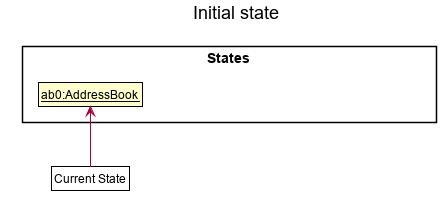
Step 1. The user launches the application for the first time. The VersionedAddressBook will be initialized with the initial address book state, and the currentStatePointer pointing to that single address book state.
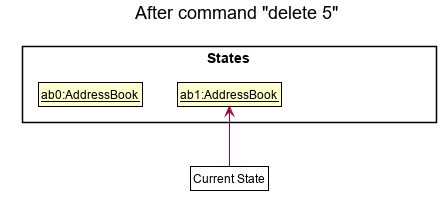
Step 2. The user executes delete 5 command to delete the 5th person in the address book. The delete command calls Model#commitAddressBook(), causing the modified state of the address book after the delete 5 command executes to be saved in the addressBookStateList, and the currentStatePointer is shifted to the newly inserted address book state.
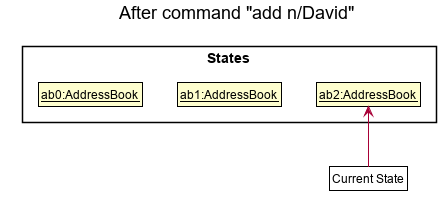
Step 3. The user executes add n/David … to add a new person. The add command also calls Model#commitAddressBook(), causing another modified address book state to be saved into the addressBookStateList.
Note: If a command fails its execution, it will not call Model#commitAddressBook(), so the address book state will not be saved into the addressBookStateList.
Step 4. The user now decides that adding the person was a mistake, and decides to undo that action by executing the undo command. The undo command will call Model#undoAddressBook(), which will shift the currentStatePointer once to the left, pointing it to the previous address book state, and restores the address book to that state.
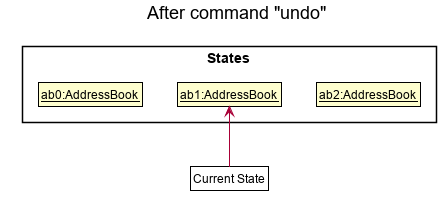
Note: If the currentStatePointer is at index 0, pointing to the initial AddressBook state, then there are no previous AddressBook states to restore. The undo command uses Model#canUndoAddressBook() to check if this is the case. If so, it will return an error to the user rather
than attempting to perform the undo.
The following sequence diagram shows how the undo operation works:
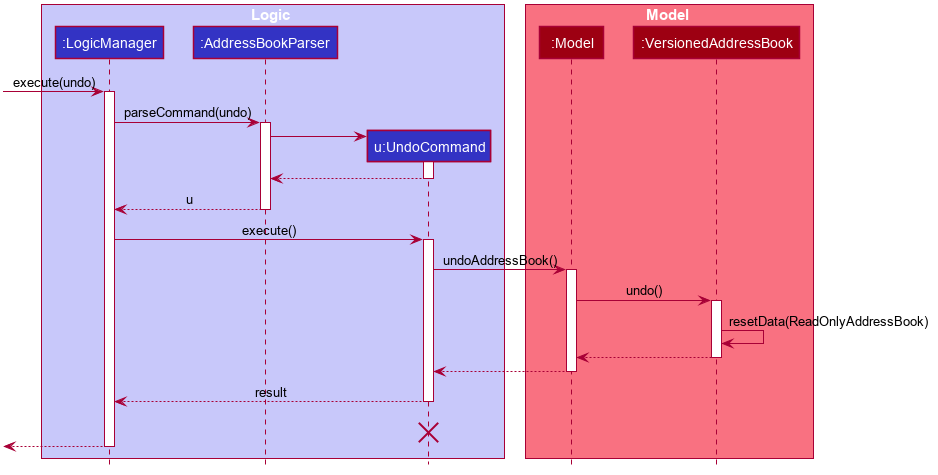
Note: The lifeline for UndoCommand should end at the destroy marker (X) but due to a limitation of PlantUML, the lifeline reaches the end of diagram.
The redo command does the opposite — it calls Model#redoAddressBook(), which shifts the currentStatePointer once to the right, pointing to the previously undone state, and restores the address book to that state.
Note: If the currentStatePointer is at index addressBookStateList.size() - 1, pointing to the latest address book state, then there are no undone AddressBook states to restore. The redo command uses Model#canRedoAddressBook() to check if this is the case. If so, it will return an error to the user rather than attempting to perform the redo.
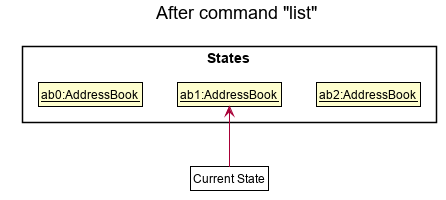
Step 5. The user then decides to execute the command list. Commands that do not modify the address book, such as list, will usually not call Model#commitAddressBook(), Model#undoAddressBook() or Model#redoAddressBook(). Thus, the addressBookStateList remains unchanged.
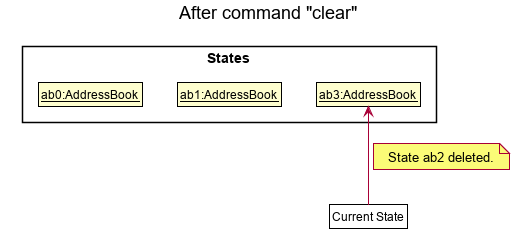
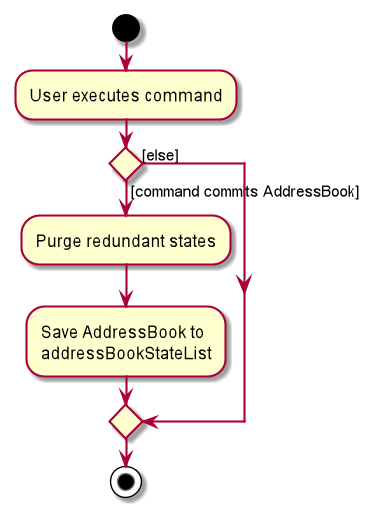
Step 6. The user executes clear, which calls Model#commitAddressBook(). Since the currentStatePointer is not pointing at the end of the addressBookStateList, all address book states after the currentStatePointer will be purged. Reason: It no longer makes sense to redo the add n/David … command. This is the behavior that most modern desktop applications follow.
The following activity diagram summarizes what happens when a user executes a new command:
Design considerations:
Aspect: How undo & redo executes:
-
Alternative 1 (current choice): Saves the entire address book.
- Pros: Easy to implement.
- Cons: May have performance issues in terms of memory usage.
-
Alternative 2: Individual command knows how to undo/redo by
itself.
- Pros: Will use less memory (e.g. for
delete, just save the person being deleted). - Cons: We must ensure that the implementation of each individual command are correct.
- Pros: Will use less memory (e.g. for
Proposed Enhancement:
[Proposed Update] User Interface
The purpose of updating the user interface is to create a more user-friendly and seamless application.
Design considerations:
- Create a light themed display.
- The display of a person card, along with its attributes, could be enhanced.
[Testing] JUnit Tests
JUnit tests
Proper JUnit tests have been added as a means to check if the features listed above are correctly implemented.
Documentation, logging, testing, configuration, dev-ops
Appendix: Requirements
Product scope
Target user profile:
- Has a need to manage a significant number of contacts
- COVID-19 Cases in Schools
- Prefer desktop apps over other types
- Can type fast
- Prefers typing to mouse interactions
- Is reasonably comfortable using CLI apps
- Has access to details of students
- School admins
Value proposition:
- Manage contacts faster than a typical mouse/GUI driven app
- To enable the school’s COVID-19 management task force to identify and implement the correct measures for students who are positive/close-contact
User stories
Priorities: High (must have) - * * *, Medium (nice to have) - * *, Low (unlikely to have) - *
| Priority | As a … | I want to … | So that I can… |
|---|---|---|---|
* * * |
new user | see usage instructions | refer to instructions when I forget how to use the App |
* * * |
user | add a new student | |
* * * |
user | delete a student | remove entries that I no longer need |
* * |
user | find a student by name | locate details of persons without having to go through the entire list |
* * |
user | find a student by status | locate details of persons without having to go through the entire list |
* * |
user | find a student by class | locate details of persons without having to go through the entire list |
* * |
user | update a student’s Covid-19 status | make the necessary changes to the student’s status as required |
* * |
user | edit a student’s details | update the details of a student’s particulars |
* |
user with many persons in the address book | sort persons by name | locate a person easily |
{More to be added}
Use cases
(For all use cases below, the System is the UltimateDivocTracker and the Actor is the user, unless specified otherwise)
Use case: Add a person
MSS
- User requests to add a person
-
UltimateDivocTracker adds a person to the list of persons
Use case ends.
Extensions
-
2a. The person already exists.
- 2a1. UltimateDivocTracker shows an error message.
Use case ends.
Use case: Delete a person
MSS
- User requests to list persons
- UltimateDivocTracker shows a list of persons
- User requests to delete a specific person in the list
-
UltimateDivocTracker deletes the person
Use case ends.
Extensions
-
2a. The list is empty.
Use case ends.
-
3a. The given index is invalid.
-
3a1. AddressBook shows an error message.
Use case resumes at step 2.
-
Use case: Finding a person by name
MSS
- User requests to find a person by name
-
UltimateDivocTracker shows the person’s information
Use case ends.
Extensions
-
2a. The given name is invalid (cannot be found).
- 2a1. UltimateDivocTracker shows an error message.
Use case ends.
Use case: Finding persons by status
MSS
- User requests to find persons by status
-
UltimateDivocTracker shows the list of persons with said status
Use case ends.
Extensions
-
1a. The given status is invalid.
- 1a1. UltimateDivocTracker shows an error message.
Use case ends.
-
2a. The list is empty.
Use case ends.
Use case: Finding persons by class
MSS
- User requests to find persons by class
-
UltimateDivocTracker shows the list of persons with said class
Use case ends.
Extensions
-
1a. The given class is invalid.
- 1a1. UltimateDivocTracker shows an error message.
Use case ends.
-
2a. The list is empty.
Use case ends.
Use case: Updating a person’s status
MSS
- User requests person’s information
- UltimateDivocTracker shows the person’s information
- User requests to update a person’s status
-
UltimateDivocTracker updates the person’s status
Use case ends.
Extensions
-
2a. The person cannot be found.
- 2a1. UltimateDivocTracker shows an error message.
Use case ends.
-
3a. The given status is invalid.
- 3a1. UltimateDivocTracker shows an error message.
Use case ends.
{More to be added}
Non-Functional Requirements
- Should work on any mainstream OS as long as it has Java
11or above installed. - Should be able to hold up to 1000 students without a noticeable sluggishness in performance for typical usage.
- A user with above average typing speed for regular English text (i.e. not code, not system admin commands) should be able to accomplish most of the tasks faster using commands than using the mouse.
- Administrative requirements: there should be at least 1 DIVOCTracker admin to monitor data entries.
- Performance requirements: the display of students’ information should be done within 2 seconds.
- Quality requirements: the system should be usable by a novice who has never administered COVID-19 statuses.
- Notes about project scope:
- DIVOCtracker is not required to handle user login and permissions.
- The central idea of the product is to provide a tracking tool for teachers/administrators to track COVID-19 in schools.
Glossary
- Mainstream OS: Windows, Linux, Unix, OS-X
- Private contact detail: A contact detail that is not meant to be shared with others
Appendix: Instructions for manual testing
Given below are instructions to test the app manually.
Note: These instructions only provide a starting point for testers to work on;
testers are expected to do more exploratory testing.
Launch and shutdown
-
Initial launch
-
Download the jar file and copy into an empty folder
-
Double-click the jar file Expected: Shows the GUI with a set of sample contacts. The window size may not be optimum.
-
-
Saving window preferences
-
Resize the window to an optimum size. Move the window to a different location. Close the window.
-
Re-launch the app by double-clicking the jar file.
Expected: The most recent window size and location is retained.
-
-
{ more test cases … }
Deleting a person
-
Deleting a person while all persons are being shown
-
Prerequisites: List all persons using the
listcommand. Multiple persons in the list. -
Test case:
delete 1
Expected: First contact is deleted from the list. Details of the deleted contact shown in the status message. Timestamp in the status bar is updated. -
Test case:
delete 0
Expected: No person is deleted. Error details shown in the status message. Status bar remains the same. -
Other incorrect delete commands to try:
delete,delete x,...(where x is larger than the list size)
Expected: Similar to previous.
-
-
{ more test cases … }
Adding a person
-
Adding a person to the list
-
Prerequisites: None
-
Test case:
add n/John Doe p/98765432 e/johnd@example.com a/John street, block 123, #01-01 c/5A s/NEGATIVE
Expected: Student John Doe is added to the list. Details of the added contact shown in the status message. -
Test case:
add 0
Expected: No person is added. Error details shown in the status message. Status bar remains the same. -
Other incorrect delete commands to try:
add ?!@,add p/1231923,...(Missing details)
Expected: Similar to previous.
-
-
{ more test cases … }
Saving data
- Dealing with missing/corrupted data files
- {explain how to simulate a missing/corrupted file, and the expected behavior}
- { more test cases … }